
SorterOS — Operations
Shutting down the machine
How-to guideTwo proper ways to power the machine down, and why pulling the plug is a last resort.
The machine's computer writes files continuously while it runs. Cutting power mid-write can corrupt those files and leave the machine unable to start. Use one of the two shutdowns below, then cut power.
Option 1: from the UI
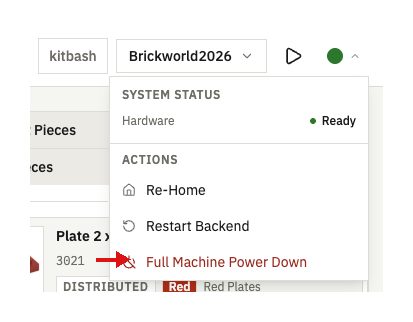
Click the dropdown at the top right of the UI and select Full Machine Power Down.
Option 2: the button on the Orange Pi
Press the small black button on the side of the Orange Pi once (circled below). That begins the shutdown procedure.

You'll know it's shut down when the red and green light on the board have stopped blinking.
With either option, the full shutdown takes about a minute and a half. Wait for it to finish before flipping the switch or unplugging the machine.
Cutting power directly
Flipping the power switch or pulling the plug while the machine is running skips the shutdown entirely. Any file being written at that instant can be corrupted, and the machine may not start again until it is serviced.
Cut power directly only in an emergency (a jam you cannot stop, smoke, anything unsafe). It is an emergency stop, not a shutdown.